Mail, calendar, and an AI agent that triages, drafts, and schedules across every app you work in. You stay in control — nothing sends without your approval. Close the laptop earlier.
Trusted by top teams










// How it works
// Core
[ 01 / 04 ] · Triage
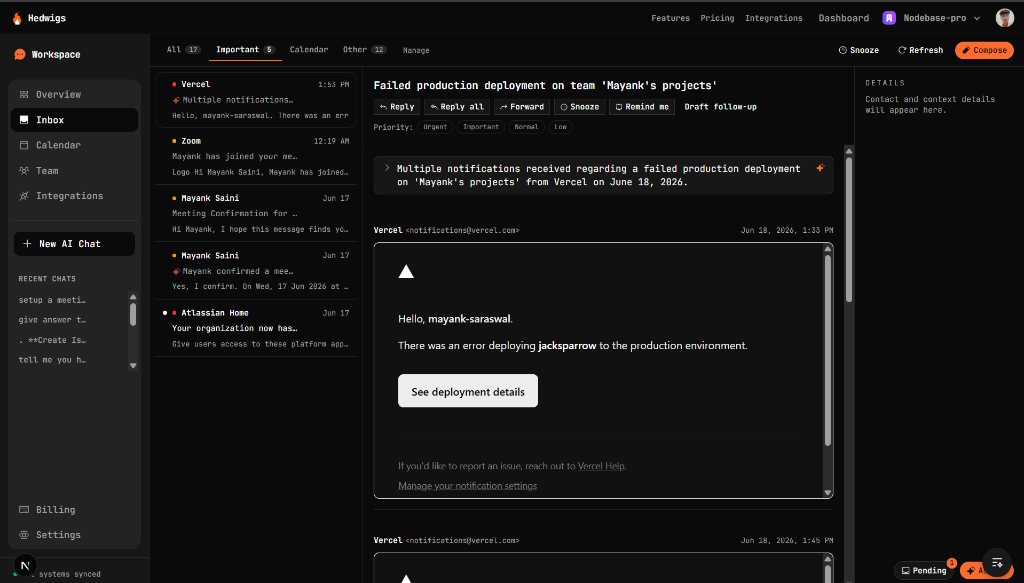
Every email is scored the moment it lands — urgent, important, or noise — so your Important tab only holds what truly matters.
[ 02 / 04 ] · Agent
Ask it to reply, schedule, or follow up. It drafts the action and waits — nothing leaves your account until you approve it.
[ 03 / 04 ] · Calendar
Accept invites from the thread, see your week without leaving the inbox, and book meetings in a keystroke.
[ 04 / 04 ] · Search
Hybrid search blends semantic recall with live mailbox lookups, so the right thread surfaces in under a second.
// Agent ready
From the web, the command palette, or a chat message — describe what you want and the agent assembles the actions. Every send and event is an approval away, never a surprise.
> schedule a call with bob@x.com Thursday 9am
  and email him that I look forward to it

drafted 2 actions ✓
  1. create_event · Thu 09:00 · bob@x.com
  2. send_email · bob@x.com

awaiting approval…
+2 hrs
of sleep reclaimed each day
2×
faster through the inbox
4 hrs
saved every week
// Loved by power users
“I cleared my inbox before my coffee got cold.”
“The approval flow means I actually trust the AI.”
“Telegram + inbox is unreasonably good.”
// Simple pricing
Free
Perfect for personal email triage.
Pro
For active professionals and power users.
Business
For team collaboration and business tools.
Enterprise
For teams requiring compliance and dedicated resources.
// Get started
Connect your mail in a minute. Tokens are encrypted per user and nothing sends without your approval.
Every write action — sending mail, creating events, RSVPs — becomes a pending action you approve. The assistant can draft, but it can never act on your behalf without a tap.
Gmail, Outlook, and Google Calendar today, connected securely through Corsair with tokens encrypted per user. More integrations land every month.
Yes. Link Telegram or WhatsApp and message the bot — it drafts the same approvable actions and posts confirmation back to the chat.
Completely. A command palette, single-key shortcuts, and an undo stack let you fly through your inbox without touching the mouse.
 Hedwigs